
Integrations
Tracking and consent
Choose who sends checkout events, connect real consent choices and verify results in your destination accounts.
Where to go WooCommerce → Trim Checkout → Tracking
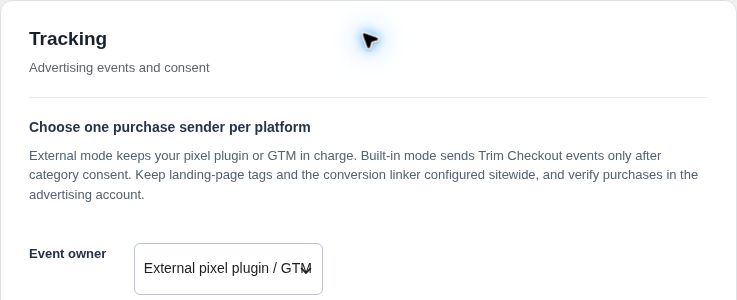
Choose one event owner
- Select Event owner
Keep External pixel plugin / GTM when another integration owns your events. Choose Trim Checkout built-in tags only when you want Trim to own the supported checkout events. - Select Consent owner
Use Trim Checkout consent defaults, or External CMP owns defaults when your consent manager initializes those defaults before tags run. - Connect and test your consent manager
Wire the supported consent API to the visitor’s actual analytics and advertising choices. Follow the integration reference in the plugin’s included TRACKING.txt. Installing a consent plugin alone does not connect it. - Configure destinations only when needed
For built-in mode, enter your Meta Pixel ID, GA4 measurement ID and/or Google Ads conversion ID plus label. Choose one primary Google Ads purchase path to avoid counting direct Ads events and GA4 imports twice. - Validate before going live
Save, then test denied, partial, granted and revoked consent. Verify a sandbox/test purchase in the actual destination tools and check for duplicate events.
No automatic consent grantAnalytics and advertising start denied. Trim does not include a consent banner or advanced cookieless Consent Mode pings. Marketing/recovery opt-in is a separate choice.
What this setup covers
- Checkout events
- Supported checkout and purchase events. This is not a full-site page-view, product-feed or audience setup.
- Sitewide tags
- Keep the appropriate base tags, landing-page attribution and conversion linker configured across the store.
- Server purchase events
- Optional Meta Conversions API and GA4 Measurement Protocol require eligible paid orders, category consent, configured secrets and working scheduled jobs. GA4 also requires the checkout client ID.
- Secret fields
- Enter secrets only in the secure administration screen. Leaving a saved secret field blank keeps its existing value; “Remove saved secret” removes it.
Check before you finish
- Exactly one intended sender owns each purchase event per destination.
- Denied and revoked choices prevent the corresponding built-in tracking.
- Destination accounts show the expected test order and amounts.
- No live credentials or customer data are included in screenshots or support messages.